
TrueBond -Al Video Editor&Hug
KL Technology LimitedArt & Design
4.691.00 Reviews
- Version
- 1.6.1
- Installs
- 50.00K
- Age Rating
- Teen
Screenshots
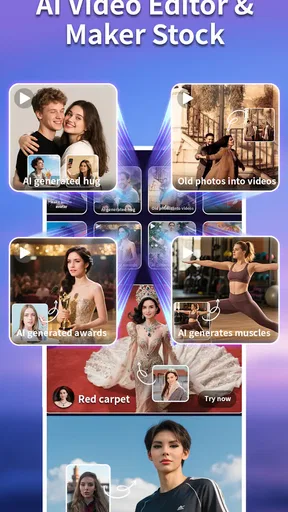
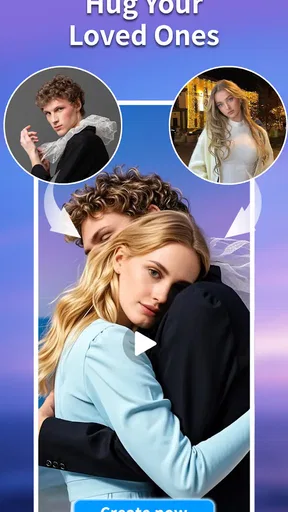
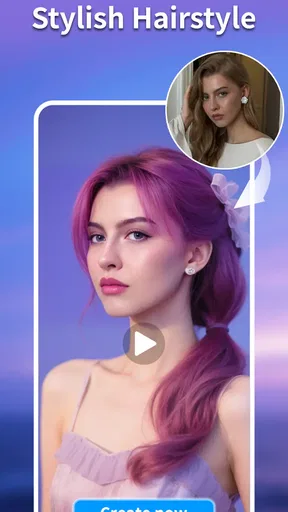
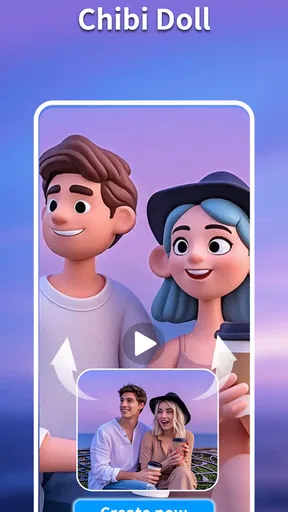
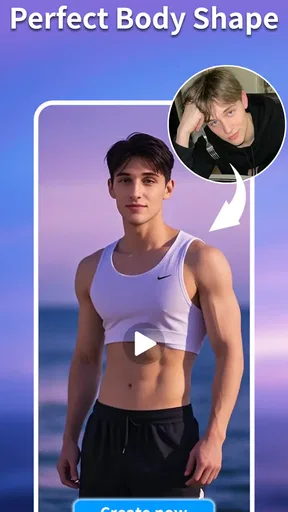
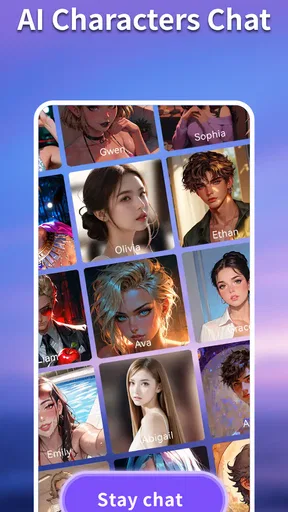
Our Review of TrueBond -Al Video Editor&Hug
 Analysis by Appyee
I tried TrueBond -Al Video Editor&Hug as an AI-focused creative app and found it most interesting when I stopped treating it like a traditional editor. Its appeal is the promise of turning a simple idea into a short visual result without asking me to build every scene manually. That makes it a different kind of tool from a standard timeline editor, drawing app, or slideshow maker.
The app sits in the Art & Design category and is developed by KL Technology Limited. It is free to install, carries a Teen content rating, and supports devices running Android 7.0 or later. The current version is 1.6.1, and the app has reached over 50 thousand installs. Those details make it easy to try, but the real question is whether the free experience is useful enough before optional spending becomes part of the workflow.
My short answer is that TrueBond is worth exploring if you want quick, idea-led AI video experiments. I would not choose it as my only editor for detailed production work, precise commercial branding, or projects where every frame must behave exactly as planned. It is better understood as a fast creative starting point: something that helps me move from a thought, mood, or relationship concept toward a shareable video.
How the free experience fits into the app
The most important cost detail is straightforward: the app itself is free. That lowers the barrier for casual testing, especially if I only want to see whether its AI video approach matches my style. There are also in-app purchases ranging from $1.99 to $104.99 per item, so “free” should be read as free access to the app rather than a guarantee that every possible output or creative option costs nothing.
I appreciate that distinction because AI video tools can feel inexpensive at first and then become harder to judge once a user starts producing more frequently. A person making one occasional greeting video has a very different idea of value from someone creating content every week. Before paying, I would spend time learning what the free workflow allows, how much editing I can do after generation, and whether the results are consistent enough for my purpose.
The purchase range is broad, which means the right decision depends on usage rather than on the existence of a premium option alone. I would not buy anything simply because an attractive result appears in the first session. Instead, I would test the same idea more than once, save the strongest version, and decide whether the improvement is meaningful enough to justify spending. That approach matters more here than comparing the app with a single fixed-price editor.
For a user who only needs a quick creative experiment, the free entry point is the strongest part of the value proposition. For a frequent creator, the purchase screen deserves more attention. The app may be convenient, but convenience has to be weighed against how often I need to regenerate a result, refine it, or make several variations before finding one that feels usable.
What I found useful in the creative workflow
TrueBond works best when I begin with a clear visual intention instead of a vague request. “Make something nice” is not a helpful creative brief. I get more useful direction by deciding who the video is for, what emotion it should carry, and whether I want a playful, warm, dramatic, or celebratory tone. Even when the app handles much of the visual work, my input still determines whether the result feels personal or generic.
One practical use is a quick message for a friend or family member. I can start with a simple idea, shape it around a shared moment, and use the generated video as a more expressive alternative to a plain text message. This is where the “Hug” part of the name feels relevant: the app is naturally suited to affectionate, sentimental, or connection-focused content rather than only formal design jobs.
Another useful workflow is concept testing. If I have an idea for a short social post, I can use the app to explore its mood before spending time in a full editor. A rough AI-generated version can reveal whether the central idea is visually interesting. If it is not, I have learned that early. If it is promising, I can decide whether to polish it elsewhere.
The best way to use TrueBond is as an idea accelerator, not as a replacement for creative judgement. I still need to choose the message, inspect the result, and decide whether the visual sequence actually communicates what I intended. AI can reduce the blank-page problem, but it does not remove the need for taste.
Three practical habits that improve the results
First, I would keep the initial concept narrow. A short prompt or focused theme gives the app less room to wander. If I combine several moods, audiences, and story ideas at once, the output can lose its identity. Choosing one emotional center makes it easier to judge the result and request a better variation.
Second, I would prepare the important wording before opening the editor. AI visuals may be flexible, but the message itself should be deliberate. I find it more effective to decide the exact greeting, occasion, or call to action first, then build the visual idea around it. This prevents the common problem of ending up with an attractive clip that says nothing specific.
Third, I would treat the first generation as a draft. The first result is useful for discovering direction, not necessarily for publishing immediately. I would check whether the pacing feels natural, whether the emotional tone matches the recipient, and whether any visual detail distracts from the message. This review step is especially important for personal videos, where an awkward detail can undermine an otherwise thoughtful gesture.
These habits also help control spending. Instead of generating many unfocused versions, I can refine the idea before asking for another attempt. That makes the free trial period more informative and gives any later purchase a clearer purpose.
Where it differs from ordinary mobile editors
A conventional mobile video editor usually gives me direct control over a timeline, clips, transitions, text placement, and trimming. That is valuable when I already have photos or footage and know exactly how I want the final piece assembled. TrueBond approaches the problem from the other direction: I begin with an idea and let the app help turn that idea into a visual concept.
That difference is important. If I am editing a birthday recording, a travel montage, or a product demonstration from my own footage, a traditional editor is likely to be the better first choice. It gives me predictable control over the material I already own. TrueBond is more appealing when I want to create something from a mood or prompt and do not want to begin with a blank timeline.
It also differs from a dedicated design app. Design tools are usually stronger for fixed layouts, brand colors, posters, thumbnails, and precise typography. An AI video app can be quicker for expressive motion, but it may not offer the same level of control over every visual element. I would use TrueBond to explore a lively concept, then move to a more exact tool if the project required strict visual consistency.
In other words, this is not a simple question of which app is “better.” The choice depends on where the work begins. Traditional editors start with media and provide control. TrueBond starts with an idea and provides momentum. That makes it complementary to other creative apps, even when it cannot replace them.
Everyday scenarios where the app makes sense
Imagine I remember a friend’s birthday late in the day and want to send something more personal than a copied greeting. I could use a short theme based on the friendship, keep the message focused, and review the generated video before sharing it. The value is not professional production quality; it is the speed of turning an emotion into something visual.
A small online seller could also use the app to test a mood for a product announcement. Rather than building a complete campaign immediately, the seller might create a quick concept to see whether a warm, energetic, or playful direction feels right. If the idea works, a more controlled editor can handle the final branded version.
Students and hobby creators may find another use in visual brainstorming. A story idea, character relationship, or imagined scene can become a rough video reference. It may help communicate an atmosphere to collaborators or simply make an abstract idea easier to discuss. The output does not have to be final to be useful.
I would be more cautious with sensitive personal material. Because the app is designed around expressive visual creation, I would think carefully before using private images, intimate messages, or anything involving another person without permission. That is not a criticism unique to this app; it is a sensible boundary whenever an AI creative service is involved.
Limitations I noticed in the value equation
The biggest trade-off is control. Speed is attractive, but the more specific my requirements become, the less comfortable I am relying on an automated result. If I need exact timing, repeatable character appearance, strict brand rules, or a carefully arranged sequence, I would rather use a timeline-based editor where each decision is visible.
There is also a difference between a video that looks interesting and one that communicates clearly. AI-generated creativity can produce a strong first impression, but visual novelty is not the same as a coherent story. I would not assume that a polished-looking result is ready to send or publish without checking the details.
Another limitation is the possibility of iteration becoming the real cost. A single free attempt may be enough for a casual message, while a serious project may require several versions. Once I need repeated generation, the purchase range matters more. The app remains convenient, but its value depends on whether each new attempt moves the project forward rather than merely producing another variation.
I also would not recommend it to someone who dislikes experimentation. The app’s appeal comes from discovering a result rather than manually controlling every stage. If I want a predictable interface with familiar trimming and layering tools, I may feel more comfortable in a conventional editor. TrueBond is for users willing to guide an automated process and accept some creative surprise.
Who is most likely to get real value
I think the strongest audience is made up of casual creators, people making personal greetings, and users who often have ideas but do not want to learn a complex editing workflow. The free installation makes it practical to test without committing money immediately. Its Teen rating also gives families and younger users a clear age signal to consider before use.
It can also help creators who already use other tools. I would treat it as a sketchbook for video concepts: generate a direction here, then refine the selected idea in an editor with more precise controls. That two-step workflow makes more sense to me than expecting one app to handle brainstorming, production, branding, and final export equally well.
I would skip it if my main goal is professional consistency. A business that needs exact typography, repeatable visual identity, or detailed control over footage should begin with a dedicated editing or design application. I would also skip it if I only want to cut existing videos, because an AI idea-generation workflow may add steps rather than remove them.
Users who are highly price-sensitive should stay with the free experience until they understand what they can accomplish without purchases. The listed purchase range includes low-cost and much higher-priced items, so I would not assume that occasional use and intensive use offer the same value. The sensible approach is to judge the app by a real project, not by an impressive first impression.
My verdict after weighing free access and paid value
TrueBond -Al Video Editor&Hug is a promising choice for fast, emotionally driven AI video creation. Its main strength is helping me move from a loose idea to a visual draft without the slower setup of a traditional timeline. The app is free to install, and its 4.6 average from over 460 ratings suggests that many users find the experience appealing, while its 91 reviews provide additional evidence that it has attracted active feedback.
I would recommend trying it when the goal is a personal greeting, a creative experiment, a mood test, or a quick social concept. I would not present it as a complete substitute for a full editor. The more control, consistency, and repeatability I need, the more likely another tool will serve me better.
My buying advice is simple: start free, use one specific project, and inspect the result carefully. If the app saves me meaningful time and the available creative options match my needs, a purchase may be worthwhile. If I find myself regenerating repeatedly or fighting for precise control, I would stop before spending more and move the project to a conventional editor.
Overall, I see it as a useful creative companion rather than an all-purpose production suite. For quick ideas with a personal, visual, and affectionate tone, it is worth a try; for exact editing work, I would skip the upgrade and choose a more controllable alternative.
Verdict
Strengths of TrueBond -Al Video Editor&Hug
- AI tools create polished edits with minimal manual work.
- Hug effects add a fun, personalized touch to photos and videos.
- Useful templates help users produce content quickly.
- Simple interface is approachable for beginners.
- Suitable for creating short social media posts and stories.
Limitations of TrueBond -Al Video Editor&Hug
- Some AI effects may look unnatural in certain photos.
- Advanced features may require a subscription or in-app purchases.
- Export quality and options may vary by device or plan.
- Processing can take longer with high-resolution media.
- Privacy concerns may arise when uploading personal photos to AI tools.
Similar Picks in This Category
View All
Canva: AI Photo & Video Editor
Canva4.8

PENUP – Drawing-sharing SNS
Samsung Electronics Co., Ltd.4.5

Crafto
Kutumb App4.6

Sketchbook
Sketchbook4.1

ibis Paint X
ibis inc.4.5

Adobe Express: AI Photo, Video
Adobe4.6
Frequently Asked Questions
What is TrueBond - AI Video Editor & Hug, and what can I use it for?
TrueBond - AI Video Editor & Hug is designed for creating emotional, AI-assisted video content, including virtual hugs, couple moments, family memories, and social media clips. Its main appeal is turning photos or short recordings into more expressive videos with automated effects and templates. Before downloading, check the current feature list because available tools may vary by device, region, app version, or subscription plan.
Is TrueBond - AI Video Editor & Hug free to download and use?
The application may be available as a free download, but some editing tools, AI effects, export options, templates, or higher-quality results can require in-app purchases or a subscription. It is important to review the pricing screen carefully before starting a trial, since subscriptions may renew automatically. Also check whether exported videos include watermarks or whether free users face limits on daily creations.
How does the AI hug or photo-animation feature work?
Typically, you select or upload suitable photos, choose an AI hug or animation effect, and allow the app to process the images into a short video. Results depend heavily on image quality, facial visibility, pose, lighting, and the selected template. The generated movement may not always look natural, so users should preview the result before sharing and avoid uploading images they do not have permission to use.
Does TrueBond protect my photos and personal information?
Because the app may need to process photos, videos, faces, and other personal media, privacy should be reviewed before use. Read its privacy policy to understand whether files are processed on the device or uploaded to remote servers, how long content is retained, and whether it is shared with service providers. Avoid submitting sensitive images, and review camera, photo-library, microphone, and notification permissions.
Can I share or export videos created with TrueBond on social media?
The app is intended for creating shareable visual content, so completed projects may offer options such as saving a video to your device or posting it to social platforms. Export availability, resolution, duration, format, and watermark rules can depend on the version and subscription level. Always preview the final file, confirm that music and images are legally usable, and obtain consent before sharing videos featuring other people.
